

Prove Your Backup Actually Copied Everything
ProofSync compares your originals against a backup and verifies byte for byte, catching silent corruption a simple copy can miss.

- $19.99 one-time
- Free trial
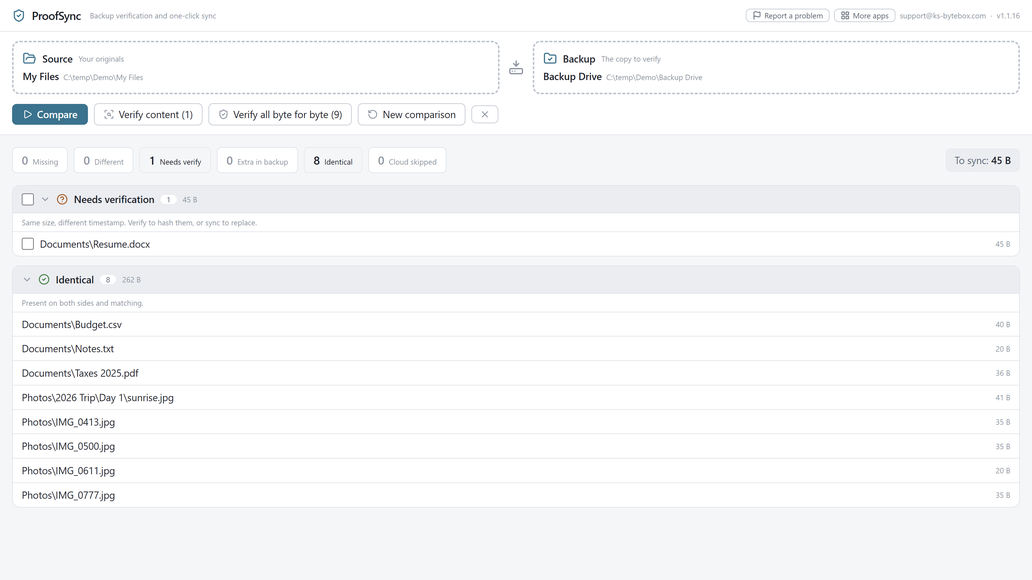
What it does
- Compare two folder trees in seconds: missing, changed, and extra files
- Byte-for-byte verification catches silent corruption the fast check cannot
- One-click sync copies missing files and updates changed ones
- The new copy is always written in full before the old one is moved aside
- Replaced files go to the Recycle Bin whenever the drive has one
- OneDrive-safe: cloud-only files are never downloaded
Good to know
- On a drive with no Recycle Bin, cleanup of extra files is refused rather than done permanently.
- Your source folder is never modified.
Frequently asked questions
What is the difference between comparing and verifying?
A fast compare matches files by size and modified time. Byte-for-byte verification goes further: it hashes every file on both sides to confirm the actual contents match, catching a file that looks fine but has silently corrupted.
What happens to files ProofSync replaces?
The new copy is written in full first, then the old one is moved aside. It goes to the Recycle Bin whenever the destination drive has one.
What if the backup drive has no Recycle Bin?
Cleanup of extra files is refused outright rather than deleted permanently, and ProofSync says so plainly.
Does it touch my original files?
No. Your source folder is never modified.
Does it work with OneDrive or network drives?
Yes. OneDrive cloud-only files are recognized and never downloaded, and it works on any folder Windows can see, including network shares.
Your data stays yours
Every KS-ByteBox app runs entirely on your PC. No accounts, no tracking, and nothing ever leaves your machine. Purchases and licensing are handled by the Microsoft Store.