

Transcribe Audio and Video Files to Text on Your PC
Turn interviews, meetings, lectures and voice memos into text. Talkscript transcribes on your own computer, so your recordings stay on your PC.

- $19.99 one-time
- Free trial
What it does
- Audio and video files: MP3, M4A, WAV, FLAC, OGG, Opus, WMA, MP4, MKV, WebM and more
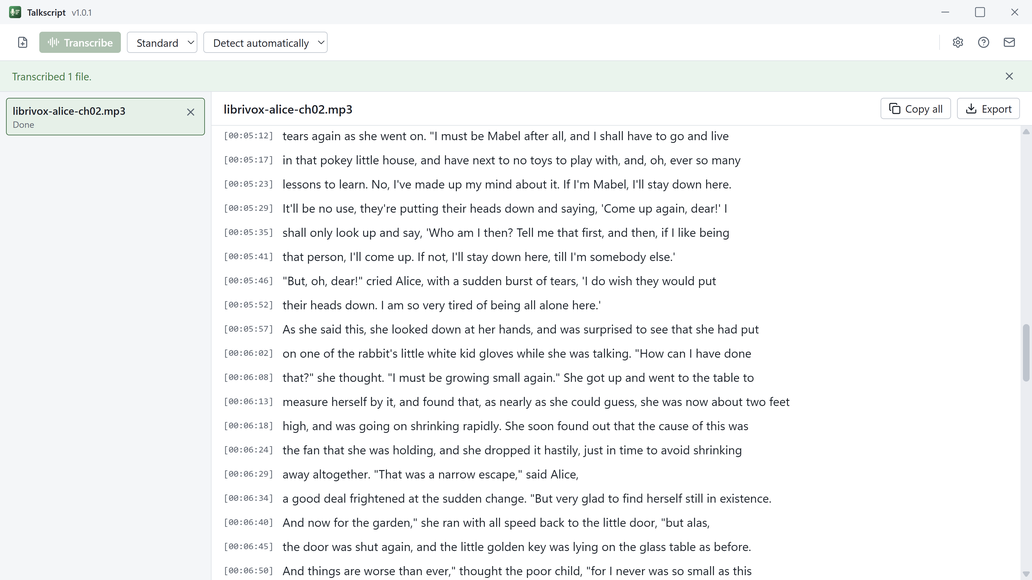
- Watch the text appear with timestamps as it works. Long recordings are fine
- Save as plain text, text with timestamps, or SRT and WebVTT subtitles, or copy it all in one click
- The included Standard model works offline from the first launch. Download Fast or Best in Settings
- Skips silence, so long pauses do not fill your transcript with stray lines
- Light and dark themes that follow your Windows setting
Good to know
- The free trial transcribes the first 5 minutes of every file. Buying unlocks whole files, copy and export.
- Talkscript works on recordings you already have. It does not record from a microphone, label speakers or edit text inside the app.
- Best is the most accurate model. On most PCs it takes about as long as the recording or longer.
- Needs a 64-bit Intel or AMD processor with AVX2 (most Intel Core chips since 2013 and AMD Ryzen chips) and at least 8 GB of memory. Some Intel Celeron and Pentium processors are not supported.
Frequently asked questions
What files can Talkscript transcribe?
Common audio and video files, including MP3, M4A, WAV, FLAC, OGG, Opus, WMA, MP4, MKV and WebM. Long recordings are fine.
What does the free trial include?
The first 5 minutes of every file, transcribed and readable. Buying unlocks whole files, copy and export.
Is Talkscript a subscription?
No. It is a one-time purchase with no account.
Are my recordings uploaded anywhere?
No. Talkscript transcribes on your PC, and your audio, video and transcripts stay there.
Does it work offline?
Yes. The included Standard model works offline from the first launch. The optional Fast (about 57 MB) and Best (about 550 MB) models download once from Settings, then work offline too.
What can I save a transcript as?
Plain text, text with timestamps, or SRT and WebVTT subtitles. You can also copy the whole transcript in one click.
Your files stay yours
All 13 KS-ByteBox apps run entirely on your PC. They have no accounts and no tracking, and your files never leave your machine. Purchases and licensing are handled by the Microsoft Store.