

Open Any SQLite Database, Read-Only by Default
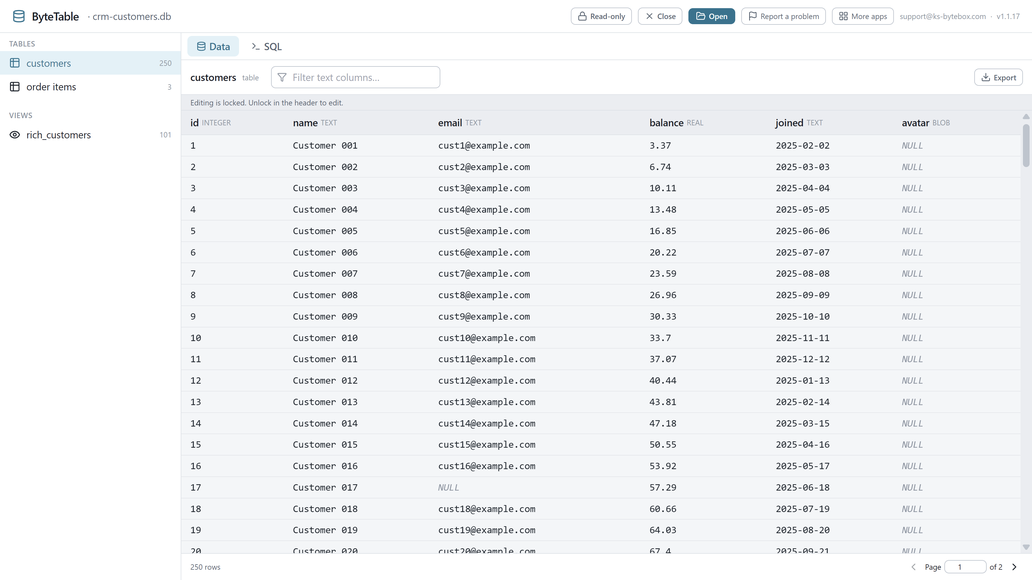
ByteTable opens a SQLite database like a spreadsheet opens a file: browse tables and views, sort, filter, run SQL, and export, all read-only until you explicitly unlock editing.

- $9.99 one-time
- Free trial
What it does
- Opens .db / .sqlite files by drag and drop or file picker
- Tables AND views, with smooth paging for large tables
- Sort, filter, and run free-form SQL queries
- Export the rows you are viewing to CSV or JSON
- Read-only by default, enforced at the database-engine level
- Explicit editing unlock; in-place cell edits and row deletion
Good to know
- CSV/JSON export and editing are paid features; the trial lists every table and browses one in full.
Frequently asked questions
Will opening a database in ByteTable change it?
Not unless you choose to. ByteTable opens every database read-only by default, enforced by the database engine itself, until you explicitly unlock editing.
Can I run my own SQL queries?
Yes, a free-form SQL console is built in.
Can I export what I am looking at?
Yes, to CSV or JSON, with values written exactly as stored.
Does it handle large tables?
Yes, tables and views page smoothly, with sorting and filtering.
What if a table or column name has spaces or special characters?
It works normally; those names are handled correctly.
Your data stays yours
Every KS-ByteBox app runs entirely on your PC. No accounts, no tracking, and nothing ever leaves your machine. Purchases and licensing are handled by the Microsoft Store.